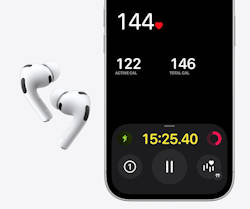
For years, the smartwatch has been the undisputed king of fitness tracking. But with the integration of an infrared Photoplethysmography (PPG) sensor into the AirPods Pro 3, Apple is quietly pushing a new paradigm: “invisible wearables.”
If you find wrist-worn devices distracting during heavy lifts, or if you simply forgot to charge your Apple Watch, your AirPods can now act as your primary biometric node.
Here is the technical breakdown of how the heart rate sensor on AirPods 3 Pro works, why the ear is biologically ideal for tracking, and how to set it up to track your workouts.
1. The Biomechanical Advantage of the Ear
To understand why AirPods Pro 3 can track your heart rate, we need to look at human vascular anatomy.
Wrist-based optical sensors struggle with two major issues: low perfusion (blood flow) in the outer dermal layers of the wrist, and “motion artifacts” caused by wrist flexion. When you grip a dumbbell, the muscles and tendons in your forearm shift, temporarily displacing the watch sensor from the capillary bed and causing data dropouts.
The ear canal, conversely, is heavily vascularized and supplied directly by the external carotid artery. The skin in the ear canal is incredibly thin, allowing the AirPods' IR emitter to penetrate deeply with minimal power output. Furthermore, because the skull moves as a single rigid unit relative to your core, the ear is immune to the localized muscle-flexing artifacts that plague wrist wearables. Based on actual tests, the heart rate monitor in AirPods Pro 3 is as accurate as a chest strap.
When seated securely with the new foam-infused tips, the AirPods Pro 3 maintain a nearly perfect, dark optical seal, eliminating ambient light interference—a common failure point for smartwatches in bright sunlight.
The other wireless earbuds with a heart rate sensor were Jabra Elite Sport, which has been discounted for many years.
2. The Setup Protocol and BLE Transmission
The AirPods Pro 3 don't just measure your heart rate; they broadcast it using standard Bluetooth Low Energy (BLE) protocols. This means they function exactly like a dedicated Bluetooth heart rate monitor (HRM).
How to initialize tracking without an Apple Watch:
- Insert both AirPods Pro 3 to ensure a closed optical loop.
- Open the Fitness app on your iPhone.
- Tap Start Workout.
- The system will automatically poll available biometric nodes. If an Apple Watch is absent or dead, iOS defaults to the H2 Biometric Profile broadcasting from your AirPods.
- You will hear a subtle, low-frequency acoustic chime confirming the biometric handshake is complete.
Because the calculation of the pulse wave happens locally on the H2 chip, the earbuds transmit only a tiny telemetry packet (your BPM) every second to your phone, keeping the battery drain localized to roughly 45mW.
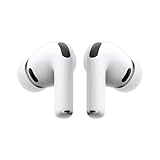
- WORLD’S BEST IN-EAR ACTIVE NOISE CANCELLATION — Removes up to 2x more unwanted noise than AirPods Pro 2* so you can stay fully immersed in the moment.*
- BREAKTHROUGH AUDIO PERFORMANCE — Experience breathtaking, three-dimensional audio with AirPods Pro 3. A new acoustic architecture delivers transformed bass, detailed clarity so you can hear every instrument, and stunningly vivid vocals.
- HEART RATE SENSING — Built-in heart rate sensing lets you track your heart rate and calories burned for up to 50 different workout types.* With iPhone, you will have access to the Move ring, step count, and the new Workout Buddy,* powered by Apple Intelligence.*
- LIVE TRANSLATION — Communicate across language barriers using Live Translation,* enabled by Apple Intelligence.*
- EXTENDED BATTERY LIFE — Get up to 8 hours of listening time with Active Noise Cancellation on a single charge. Or up to 10 hours in Transparency using the Hearing Aid feature.*

3. Surviving the Salt: Understanding IP57
If you are using earbuds as your primary fitness tracker, they are going to be subjected to corrosive human sweat. The AirPods Pro 3 carry a newly upgraded IP57 rating, which is comparable to Sony WF-1000XM6 and Galaxy Buds 4 Pro. Let's break down what that actually means in a materials engineering context.
- The “5” (Solid Ingress): This indicates dust protection. The acoustic meshes covering the external microphones have been redesigned with a tighter microscopic weave, preventing chalk dust (from weightlifting) from fouling the transducer diaphragms.
- The “7” (Liquid Ingress): This means the device can withstand full immersion in 1 meter of water for 30 minutes.
However, IP ratings are tested in highly purified, deionized water. Human sweat is a highly conductive, corrosive saline solution. To combat galvanic corrosion on the charging contacts and internal circuitry, Apple has coated the internal PCB with a conformal hydrophobic polymer.
Maintenance Tip: While the internals are protected, the external charging contacts can still undergo electrolysis if placed in the charging case while wet. Always wipe the stems down with a microfiber cloth before docking them.
The Verdict
The AirPods Pro 3 aren't just an audio accessory; they are a highly capable, standalone biometric sensor (one of the hidden features of AirPods Pro 3).
By leveraging the superior perfusion of the ear canal and utilizing standard BLE profiles, they offer a viable, often superior, alternative to wrist-based tracking for those who prefer an unencumbered workout.

Do you have any questions on using AirPods Pro 3 a workout tracker?
Please let us know in the comment box below if you have any questions about tracking your workout with the heart rate monitor on AirPods Pro
This is part of the AirPods Pro 3 guide series. This series begins with a Long-Term Review covering ANC and battery life, followed by a deep dive into computational audio in our audiophile comparison. We also put the new biometrics to the test with a phone-only workout guide and a rigorousheart-rate accuracy test against clinical-grade chest straps.
To help you maximize your hardware, we uncover 4 hidden features of AirPods Pro 3 like edge-based translation, configure the ultimate student setup for campus life, and optimize beamforming mics for commuting and open offices. Finally, we explain the exact material-science protocols needed in our AirPods Pro 3 cleaning and maintenance guide.
You may check Headphone 101 for detailed explanations of headphone technologies and terms.
For Bluetooth headphone guides, please check the Bluetooth headphones section.
The sports headphones section is dedicated to guides on sports headphones.
You may also reach us through our Facebook page.


Leave a Reply