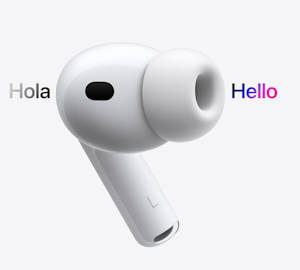
Hidden features of AirPods Pro 3? While most users treat their AirPods strictly as audio output devices, the H2 chip inside the AirPods Pro 3 is essentially a miniaturized, wearable computer.
Packed with an Inertial Measurement Unit (IMU), infrared sensors, a heart rate monitor, and dedicated neural processing cores, these earbuds possess capabilities that extend far beyond simply playing music.
If you want to move beyond the basics, here is a technical breakdown of the best AirPods Pro 3 tips and tricks, leveraging the hidden features you might not realize you are wearing.
1. Sensor Fusion and Head Gestures
One of the most impressive AirPods Pro 3 hidden features is the ability to interact with Siri using silent head movements. This isn't simple motion detection; it requires complex “sensor fusion.”
The earbuds contain a 6-axis IMU (a 3-axis accelerometer paired with a 3-axis gyroscope). When a call comes in, the H2 chip begins polling these sensors at a high frequency.
To differentiate between a deliberate nod (to answer) and the natural bounce of walking, the chip uses an adaptive algorithm to filter out linear acceleration, isolating the specific rotational velocity of your neck pivot. This allows for discreet, hands-free call management without uttering a word.

2. The AirPods Pro 3 Camera Remote
A highly practical but undocumented feature is using your AirPods Pro 3 as a remote shutter for your iPhone camera. When you squeeze the capacitive force sensor on the stem while the camera app is open, it triggers the shutter.
Technically, the AirPods achieve this by temporarily registering as a Bluetooth Human Interface Device (BLE HID)—the exact same protocol used by wireless keyboards.
You need to enable it on your iPhone in Settings > Bluetooth > Tap the ‘i' next to your AirPods Pro 3 > Camera Remote, as shown in the screenshot below.
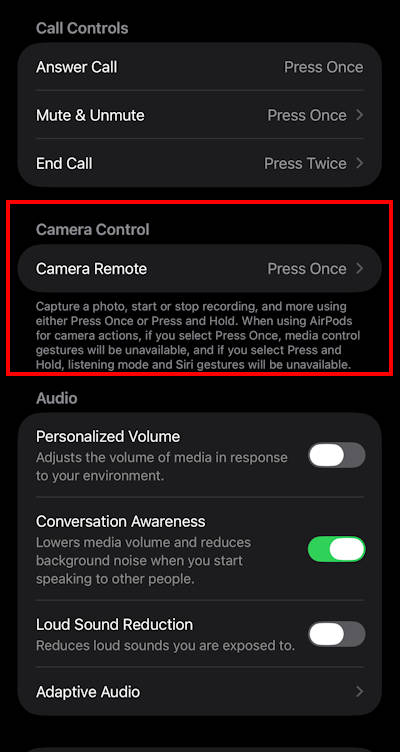
When you squeeze the stem, the AirPods Pro 3 will act as an invisible, zero-latency AirPods Pro 3 camera remote, perfect for group shots or long-exposure tripod photography where touching the phone would cause motion blur.
You can even set the trigger as a long press (press and hold) of the stem, as shown in the screenshot below.
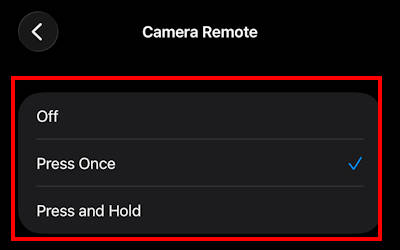
The camera remote feature is available for AirPods with an H2 chip, including AirPods Pro 2, AirPods Pro 3, and AirPods 4. The iPhone must be running iOS 26 or later.
3. On-Device Live Translation
With the integration of Apple Intelligence, the AirPods Pro 3 can perform real-time translation. What makes this technically remarkable is that the acoustic processing happens at the edge (on your iPhone and AirPods Pro 3).
Instead of streaming raw audio to the cloud (which introduces massive latency), the directional microphones capture the foreign language, and the H2's neural engine captures the audio stream, which is processed with Apple Intelligence on the phone locally. The translated audio is then synthesized and piped directly into your ear. This drastically reduces the round-trip delay, making actual bilingual conversations computationally viable.
On-device live translation is available for AirPods with an H2 chip. The paired iPhone must be running iOS 26 or later.
In the market, Samsung Galaxy Buds 4 Pro (paired with recent Galaxy S phones) and Google Pixel Buds Pro 2 (paired with a Pixel phone) also offer a similar feature.
- WORLD’S BEST IN-EAR ACTIVE NOISE CANCELLATION — Removes up to 2x more unwanted noise than AirPods Pro 2* so you can stay fully immersed in the moment.*
- BREAKTHROUGH AUDIO PERFORMANCE — Experience breathtaking, three-dimensional audio with AirPods Pro 3. A new acoustic architecture delivers transformed bass, detailed clarity so you can hear every instrument, and stunningly vivid vocals.
- HEART RATE SENSING — Built-in heart rate sensing lets you track your heart rate and calories burned for up to 50 different workout types.* With iPhone, you will have access to the Move ring, step count, and the new Workout Buddy,* powered by Apple Intelligence.*
- LIVE TRANSLATION — Communicate across language barriers using Live Translation,* enabled by Apple Intelligence.*
- EXTENDED BATTERY LIFE — Get up to 8 hours of listening time with Active Noise Cancellation on a single charge. Or up to 10 hours in Transparency using the Hearing Aid feature.*

4. Play Background Sounds (with Media)
Many users rely on third-party apps to play white noise, but streaming audio continuously drains the battery via WiFi or mobile radio. Moreover, most of these apps cannot “mix” white noise with your media.
Apple has introduced background sounds on iPhone since iOS 14. Unfortunately, many AirPods users are not aware of this hidden feature. On your iPhone, you can enable it from Settings > Accessibility > Audio/Visual > Background Sounds.
You can choose various background sounds and mix them with your playing media, or play them on their own.
Again, this AirPods hidden feature is not limited to AirPods Pro 3. You can enjoy it with any AirPods.
Please do not confuse this feature with the background music listening mode on Sony WF-1000XM6. The latter adjusts the sounds of your music and other content to simulate a distant ambience and does not add any background sounds.
Please let us know your questions or experiences with any of “hidden” features of AirPods Pro 3 in the comment box below.
Also, do not forget that you can use AirPods Pro 3 to track your workout.
This is part of the AirPods Pro 3 guide series. This series begins with a Long-Term Review covering ANC and battery life, followed by a deep dive into computational audio in our audiophile comparison. We also put the new biometrics to the test with a phone-only workout guide and a rigorousheart-rate accuracy test against clinical-grade chest straps.
To help you maximize your hardware, we uncover 4 hidden features of AirPods Pro 3 like edge-based translation, configure the ultimate student setup for campus life, and optimize beamforming mics for commuting and open offices. Finally, we explain the exact material-science protocols needed in our AirPods Pro 3 cleaning and maintenance guide.
You may check Headphone 101 for detailed explanations of headphone technologies and terms.
For Bluetooth headphone guides, please check the Bluetooth headphones section.
The sports headphones section is dedicated to guides on sports headphones.
You may also reach us through our Facebook page.


Leave a Reply